
Quick answer: Scanning is a process that converts physical files into digital images like PDF. Digitization makes these files searchable, organized, and usable inside business systems.
1. What are the main differences between scanning and digitization?
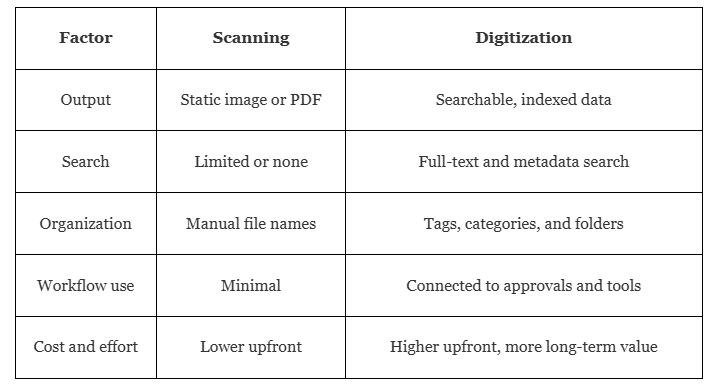
Document Scanning converts a paper document into a static image whereas digitization turns that image into searchable, indexed data your team can use. The scanned PDF may look just like the original, yet the words inside it usually can’t be searched, sorted, or edited.
Digitization involves optical character recognition (OCR), metadata, and organized storage, so you can get the same document instantly by typing a keyword, a date, or a project name.
Takeaway: Every digitization project includes scanning, but scanning alone never delivers the full benefit of going digital.
2. When to Use Scanning?
Scanning is mainly used when you need a digital copy of a paper record but do not need to search, edit, or reuse its contents. It is a quick and affordable way to avoid disorganization and protect confidential files from loss or damage. Here are some practical examples where you can use scanning:
- You want a backup of records that rarely change
- You need to email a quick copy of a signed document
- Compliance rules require an archived image of the original
- The files are inactive, such as closed project folders or old invoices
Because a scanned file is usually just an image, finding it later depends on a clear file name and folder structure. That works well for low-activity archives. If your team will search these files often, scanning alone will likely become a bottleneck over time.
3. When to Use Digitization?
Digitization helps in various ways. When your team needs to find, share and work on anything in particular inside a document, it is always better to make those records accessible easily.
Digitization makes sense when:
- Staff search for documents several times a week
- People in different offices or job sites need the same files
- Information feeds approvals, reports, or other software
- You are building a long-term paperless workflow
For example, an architecture firm digitizes its drawings, RFIs, and submittals, the team can find the latest version of any sheet in seconds. Searchable files also reduce the risk of working from outdated files. It helps teams avoid costly rework and keeps projects on schedule.
4. Which Documents Can Be Digitized?
As per recent reports, 60% of Indian small businesses have already adopted document digitization by 2025. Any paper or image-based file can be digitized, and most organizations begin with the files they use most often. The initial starting point is usually the set of documents that cause the most delays when someone cannot find them.
The list includes:
- Government contracts and legal agreements
- Bulk invoices, purchase orders, and other financial statements
- Staff records and HR forms
- Blueprints, drawings, and project plans
- Medical, insurance, and customer records
- Photos, microfilm, and handwritten notes
Pages in good condition scan most cleanly. Faded or damaged records can often be improved with image enhancement. Large formats such as architectural drawings require wide-format scanners. Before you begin, review your retention policies, because some records must be kept in original form while others can be safely replaced by a digital copy.
5. What Are the Different Steps in a Digitization Project?

A digitization project works best when it follows a complete sequence. Here is the 8 different steps in a digitization project:
- Assessment and planning
Review document types, volumes, and access needs, then set measurable goals. - Preparation
Eliminate staples, repair damaged or torn pages, and sort files logically. - Scanning
Check each page at a resolution suited to its format. - Data extraction
Use OCR so the text becomes searchable and editable. - Indexing
Adding metadata such as dates, project names, or document types. - Quality control
Check that images are clear and indexed data is accurate. - Upload and integration
Move files into a document management system. - Retention and disposal
Securely store or destroy originals according to policy.
6. Is Document Digitization Secure?
Yes, document digitization is 100% secure when it is paired with the right safety. Paper can be lost, or damaged but digital records are protected by multiple layers of control.
Check for these protections:
- Encryption for files in storage and in transit
- Permissions that limit who can view or edit records
- Multi-factor authentication for user logins
- Detailed activity logs for every document action
- Daily backups to guard against fire, flooding, or hardware failure
Wrapping Up
Scanning gives you a digital copy, while digitization gives you right information within seconds. Start by identifying which documents your team searches for most, then match the approach to how often they are used.